Carbon Market Network


A customer just asked for your carbon footprint. Your bank wants climate data. Your biggest buyer sent a supplier questionnaire with a deadline.
You have no sustainability team and no budget for a platform that costs more than a company car.
Here is the good news. Free carbon accounting software exists, and some of it is genuinely good.
This guide shows you which free tools are worth your time, what each one includes, where each one stops, and how to turn raw business data into a credible carbon footprint without paying a cent.
What Is Free Carbon Accounting Software?
Carbon accounting software helps you measure, track, and report the greenhouse gases your business causes. It turns activity data, such as litres of fuel, kilowatt-hours of electricity, and supplier spend, into tonnes of carbon dioxide equivalent (CO2e).
Free carbon accounting software does the same job at no cost. The word “free” covers several very different things, though.
Some tools are free forever. Some are free calculators for quick estimates. Some are open source. Some are spreadsheets from governments. Some are only free for a trial period.
Carbon Market Insider Newsletter
Weekly insights on carbon markets, climate policy, carbon credits, and sustainability.
The Five Types of “Free”
| Type of free | What you get | Typical limit | Best for |
|---|---|---|---|
| Free forever platform | A full online tool with a real inventory | One user, limited reports, paid upgrades | First footprint, supplier requests |
| Free carbon calculator | A fast estimate from a few inputs | Rough accuracy, no audit trail | Awareness and a quick baseline |
| Government or standard-setter spreadsheet | Calculation workbooks built on published methods | Manual data entry, one year at a time | Small organizations that like control |
| Open-source software | Code you can use, inspect, and change | Needs technical skills to set up | Developers and IT teams |
| Free tier of an API or database | Emission factors and calculation endpoints | Often non-commercial or low volume | Researchers, students, builders |
Free trials are different. A trial ends. If a vendor asks for a credit card or says “14 days,” that is a trial, not free software.
Free Carbon Accounting Software vs Carbon Calculators
People use these terms loosely, but they are not the same thing.
A carbon calculator gives you a number. You answer a few questions and get an estimate.
Carbon accounting software gives you a system. It stores your data, applies emission factors, separates Scope 1, 2, and 3, and produces a record you can review next year and defend to a customer.
Calculators are a great start. Accounting software is what you need when someone asks, “How did you get this number?”
Who Needs Free Carbon Accounting Software?
You do not need to be an environmental expert. Several kinds of organizations reach for free carbon accounting tools.
- Small and mid-sized businesses (SMEs) that sit in the supply chain of larger companies
- Startups that need a baseline for investors or climate commitments
- Suppliers and manufacturers answering customer questionnaires and CDP requests
- Nonprofits, schools, and universities with tight budgets
- Consultants and students learning how carbon accounting works
- Larger companies that want to pilot a process before buying an enterprise platform
If you are in the first group, pay attention to this point. Large customers increasingly ask suppliers for emissions data, even when the supplier has no legal duty to report.
A free tool gives you an answer to give them.
What Should You Look for in Free Carbon Accounting Software?
Not all free tools are equal. Some are polished products. Others are a spreadsheet with a logo.
Use this checklist before you invest hours of data entry.
| Feature | Why it matters | Must have or nice to have |
|---|---|---|
| GHG Protocol alignment | The global standard that nearly every framework builds on | Must have |
| Scope 1 and Scope 2 coverage | The foundation of any inventory | Must have |
| Location-based and market-based Scope 2 | Most frameworks ask for both | Must have |
| Scope 3 coverage | Usually the largest part of your footprint | Strongly preferred |
| Transparent emission factors | You must know which factors the tool uses | Must have |
| Data export | Prevents lock-in and lets you move later | Must have |
| Multiple years of data | Lets you track progress | Strongly preferred |
| Audit trail | Shows who entered what and when | Nice to have |
| Framework report templates | Saves time on CDP, CSRD, and similar | Nice to have |
| Multi-user access | Lets finance, operations, and sustainability collaborate | Often paid |
Two items deserve extra attention.
Emission factors. These are the multipliers that convert activity into emissions, such as kilograms of CO2e per kilowatt-hour. A tool that hides its factors is a black box. Pick tools that tell you where their numbers come from.
Data export. A free tool can change its terms. Make sure you can take your data with you.
The Best Free Carbon Accounting Software and Tools
Here is a practical look at the strongest free options. Each one fits a different situation.
Comparison at a Glance
| Tool | Type | Scopes covered | Best for | Main limit |
|---|---|---|---|---|
| Persefoni Pro | Free forever platform | 1, 2, and all 15 Scope 3 categories | Companies wanting a full inventory | Single user, detailed reports often paid |
| Normative Business Carbon Calculator (via SME Climate Hub) | Free calculator | 1, 2, and 3 estimates | Small businesses under 50 employees | Estimate, not an audit-ready inventory |
| Greenly Carbon Calculator | Free calculator | Company-level estimate | A quick first look | Full service is paid |
| EPA Simplified GHG Emissions Calculator | Excel workbook | 1, 2, and 3 | Small organizations, especially in the US | Manual, one year at a time |
| GHG Protocol calculation tools | Spreadsheets | Varies by tool | Learning the method properly | Manual work |
| Climatiq free tier | Emission factor data and API | Factors for all scopes | Developers, researchers | Free tier is non-commercial |
| Cloud Carbon Footprint | Open-source software | Cloud-related Scope 3 | IT and engineering teams | Needs technical setup |
| openLCA | Open-source LCA software | Product footprints | Product carbon footprints and researchers | Steep learning curve |
1. Persefoni Pro: Best Free Platform for a Full Inventory
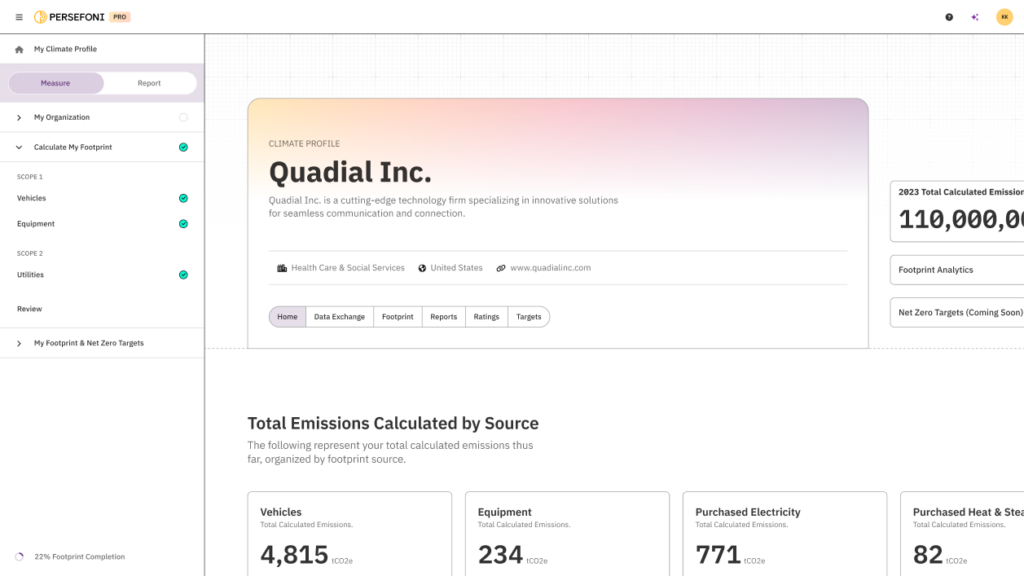
Persefoni Pro stands out because it is a real platform with a free tier, not a demo.
According to Persefoni’s pricing page, Pro costs nothing, has no trial period or time limit, and needs no credit card. It covers Scope 1, Scope 2, and all 15 categories of Scope 3.
It also includes an in-app AI assistant called Copilot and a Sustainability Report Builder with guided workflows for frameworks such as CSRD, ISSB, and CDP.
What you get for free:
- Scope 1, 2, and 3 footprint calculation
- Unlimited assets and historical reporting years
- Guided workflows for people new to carbon accounting
- Help Center, tutorials, and an academy
Where it stops:
- One user only
- Detailed, exportable GHG metrics reports are mostly paid add-ons
- Advanced analytics, integrations, and reduction modeling sit in the paid tier
This tool suits companies with low to medium operational complexity, such as a services firm, a small manufacturer, or a retailer, that need a defensible number fast.
2. Normative Business Carbon Calculator: Best for Very Small Businesses
Normative built this calculator with support from Google.org, and it is available free through the UN-backed SME Climate Hub.
It is designed for businesses with up to 50 employees and under €10 million in turnover. It follows the GHG Protocol.
You create a business profile, add data you already have, and get a dashboard that shows your estimated emissions and hotspots.
Why it works: It asks for data that small businesses actually have, like energy bills and spending, and it shows you where emissions concentrate.
The catch: It estimates. It is a starting baseline, not a package for an auditor.
3. Greenly Carbon Calculator: Best for a Five-Minute First Look
Greenly offers a free online calculator that Greenly describes as a five-minute assessment of your company’s emissions.
Use it when you want an order of magnitude before deciding how deep to go. Greenly’s full platform and expert support are paid services.
Treat the output as a conversation starter, not a final inventory.
4. EPA Simplified GHG Emissions Calculator: Best Free Spreadsheet
The US Environmental Protection Agency publishes an Excel-based calculator that helps small and low-emitting organizations estimate their annual emissions.
According to EPA, it calculates Scope 1, 2, and 3 emissions from activity data for one annual period. It includes help text for each emission source.
What to know before you use it:
- It runs on a recent version of Excel, and Microsoft 365 or Excel Online also works
- It uses macros for navigation, so you must enable them
- It handles one reporting year at a time, so you will need to keep each year’s file
- It uses US-oriented factors, so check whether they fit your country
Even if you are outside the United States, it is a useful way to learn how an inventory flows from data to totals.
5. GHG Protocol Calculation Tools: Best for Learning the Method
The GHG Protocol is the foundation for almost every corporate emissions framework. It publishes free guidance documents and calculation worksheets.
These are not slick software. They are methods in spreadsheet form.
If you want to understand why a number is what it is, working through these tools teaches you more than any dashboard will.
6. Climatiq: Best Free Emission Factor Source for Builders
Climatiq is a carbon calculation API and emission factor database. It offers a free starter plan, but the free tier is licensed for non-commercial use, and commercial access and API volume sit in paid plans.
Developers use it to embed carbon calculations into apps, ERP systems, and logistics tools. Students and researchers use the free tier to browse factors.
Check the current plan terms before building anything commercial on it, because pricing and limits change.
7. Cloud Carbon Footprint and Cloud Provider Tools: Best for IT Emissions
If you run software in the cloud, you create emissions you can measure.
Cloud Carbon Footprint is an open-source tool, sponsored by Thoughtworks and released under the Apache 2.0 license. It estimates energy use and carbon emissions from usage on AWS, Google Cloud, and Microsoft Azure, with breakdowns by provider, account, service, and time period.
The major providers also include their own free dashboards:
- AWS Customer Carbon Footprint Tool
- Microsoft Emissions Impact Dashboard
- Google Cloud Carbon Footprint
Cloud emissions count as part of your Scope 3. These tools help you fill that line in your inventory.
8. openLCA: Best Free Tool for Product Carbon Footprints
Company-level accounting answers “what does my business emit?” Life cycle assessment answers “what does one product emit?”
openLCA is free, open-source life cycle assessment software. It is powerful, but it has a learning curve, and the best background datasets are often licensed.
It suits researchers, students, engineers, and product teams who need to go beyond a corporate footprint.
Which Free Tool Should You Choose?
| Your situation | Start with |
|---|---|
| Customer asked for your footprint, you have no team | Persefoni Pro |
| Under 50 employees, need a quick baseline | Normative calculator via SME Climate Hub |
| Want a fast gut check in five minutes | Greenly calculator |
| Prefer spreadsheets and full control | EPA calculator plus GHG Protocol tools |
| Developer building carbon features | Climatiq free tier (non-commercial) or open-source factor sets |
| Tech company with heavy cloud use | Cloud provider dashboards plus Cloud Carbon Footprint |
| Need product-level footprints | openLCA |
The Catch: What Free Tools Usually Leave Out
Free tools are useful. They are not magic.
Know the common limits before you rely on one for a high-stakes report.
| Limit | What it means for you |
|---|---|
| Single user | Only one person can log in, so teamwork happens outside the tool |
| Limited exports | You may not get framework-ready files without paying |
| No supplier engagement | You cannot easily collect data from your suppliers |
| Basic or no integrations | You enter data by hand instead of connecting your accounting or ERP system |
| Light support | You rely on help articles instead of a human |
| No assurance support | Auditors want evidence trails that free tools may not provide |
| Generic emission factors | Estimates may use averages instead of your supplier’s actual data |
None of these are dealbreakers for a first footprint. They become problems when you scale or when regulators and auditors get involved.
How to Calculate Your Carbon Footprint with Free Software: Step by Step
The software matters less than your process. Follow these steps and any decent free tool will give you a usable result.
Step 1: Set Your Boundaries
Decide what is inside your inventory.
- Organizational boundary: Which entities, sites, and subsidiaries count?
- Operational boundary: Which emission sources count?
Under the GHG Protocol, you usually choose between the equity share approach and the control approach for the organizational boundary. For most small businesses, the operational control approach is the simplest.
Write your choice down. Keep it the same each year.
Step 2: Pick Your Reporting Year
Choose a 12-month period. A financial year is usually easiest because your finance data lines up with it.
Step 3: List Your Emission Sources by Scope
| Scope | What it covers | Typical examples |
|---|---|---|
| Scope 1 | Direct emissions from sources you own or control | Company vehicles, gas boilers, on-site generators, refrigerant leaks |
| Scope 2 | Indirect emissions from purchased energy | Electricity, steam, heating, and cooling you buy |
| Scope 3 | Everything else in your value chain | Purchased goods and services, business travel, commuting, freight, waste, use of sold products |
Scope 3 has 15 categories under the GHG Protocol. You do not need all of them on day one, but you should know which ones matter for your business.
Step 4: Collect Activity Data
Activity data means the physical or financial quantities behind your emissions.
| Emission source | Data to collect | Where to find it |
|---|---|---|
| Natural gas | Cubic metres or kilowatt-hours | Utility bills |
| Vehicle fuel | Litres or distance travelled | Fuel cards, mileage logs |
| Electricity | Kilowatt-hours | Electricity bills, meter readings |
| Refrigerants | Kilograms refilled or leaked | Maintenance records |
| Business travel | Distances, flight routes, hotel nights | Travel booking records, expense claims |
| Purchased goods and services | Spend by category | Accounting system |
| Waste | Weight by disposal method | Waste contractor reports |
| Employee commuting | Survey results or estimates | Short staff survey |
This step takes the most time. Start early.
Step 5: Choose Your Calculation Method
You have two main approaches.
| Method | How it works | Accuracy | Effort |
|---|---|---|---|
| Activity-based | Multiply physical activity (litres, kWh, km) by an emission factor | Higher | More data needed |
| Spend-based | Multiply money spent by an emission factor per currency unit | Lower | Easy, works with accounting data |
Use activity-based data wherever you can. Use spend-based as a fallback, especially for Scope 3 categories like purchased services.
Many free tools support both. A mix is normal and acceptable for a first inventory, as long as you document it.
Step 6: Apply the Right Emission Factors
Free software usually applies factors for you. Still, check them.
Good free public sources include:
- UK government conversion factors published for company reporting
- US EPA emission factors hub for US-based reporting
- National grid factors from your country, such as the CO2 Baseline Database published by India’s Central Electricity Authority
- GHG Protocol guidance on factor selection
Match the factor to your location and activity. A grid factor from a country with a coal-heavy grid will differ sharply from one with a hydro-heavy grid.
Step 7: Calculate Scope 2 Both Ways
Scope 2 has two methods.
- Location-based: Uses the average emissions of the grid where you operate
- Market-based: Reflects the electricity you chose to buy, such as a green tariff or renewable energy certificates
Most frameworks expect you to report both. Good free tools show both. If a tool only offers one, record that limit in your notes.
Step 8: Review, Document, and Save
Check your totals against common sense.
- Does electricity use match your bills?
- Are any months missing?
- Does one source dominate in a way that surprises you?
Then write a short methodology note covering boundaries, data sources, factors, and assumptions. This note is what turns a number into something you can defend.
Export your data and keep a copy outside the tool.
A Simple Worked Example
The numbers below are illustrative, to show how the pieces fit. They are not real emission factors.
Imagine a 25-person design agency with one office and one delivery van.
| Source | Activity data | Assumed factor | Result |
|---|---|---|---|
| Scope 1: van diesel | 2,000 litres | 2.7 kg CO2e per litre | 5.4 tonnes |
| Scope 2: office electricity | 30,000 kWh | 0.4 kg CO2e per kWh | 12 tonnes |
| Scope 3: purchased services (spend-based) | 200,000 currency units | 0.2 kg CO2e per unit | 40 tonnes |
| Total | 57.4 tonnes |
Look at what happened. Scope 3 is the biggest slice, even though the agency has no factory.
This pattern shows up again and again. For many service and product businesses, the value chain is where most emissions sit, and Scope 1 and 2 are the easy part.
That is why a tool that supports Scope 3, even roughly, gives you a far more honest picture than one that stops at electricity and fuel.
Do Free Carbon Accounting Tools Meet Regulatory Requirements?
Short answer: they can help you prepare, but your obligations depend on your size and location.
Rules are changing quickly. Here is the current landscape in plain language.
| Framework | Who it affects | What it asks for | Can free tools help? |
|---|---|---|---|
| EU CSRD | Large EU companies and some non-EU groups above higher thresholds | Detailed sustainability reporting, including emissions | Free tools can build your data, but you may need a fuller platform |
| California SB 253 | Companies with over one billion dollars in revenue doing business in California | Scope 1 and 2 first, Scope 3 in later phases | Possible for data prep, but large companies usually need robust systems |
| ISSB (IFRS S2) | Companies in jurisdictions that adopt the standard | Scope 1, 2, and 3 emissions measured under the GHG Protocol | Good for building the inventory, not for assurance |
| UK SECR | Large UK companies | Energy use and Scope 1 and 2 emissions | Often workable with a calculator and good records |
| India BRSR | Large listed Indian companies | Scope 1 and 2 data and other sustainability indicators | Useful for data collection |
| Customer and supplier requests (CDP, EcoVadis, questionnaires) | Any supplier | Footprint data on request | Free tools often fit this need well |
The EU Eased the Load on Small Companies
The EU’s Omnibus simplification package narrowed CSRD to companies with more than 1,000 employees and more than €450 million in net turnover. The European Commission has also adopted revised, simpler reporting standards and a voluntary standard for smaller companies based on the VSME.
That voluntary standard limits what large companies can demand from small suppliers in their value chain.
For small businesses, this is good news. Fewer of you face a legal reporting duty, and large customers have less room to send you unlimited questionnaires. A free tool gives you a clean, standard answer.
California’s Rules Focus on Very Large Companies
California’s SB 253 applies to companies above the revenue threshold that do business in the state. The first reporting cycle covers Scope 1 and 2 only, with Scope 3 coming later. The California Air Resources Board has signaled that it will use enforcement discretion for good-faith efforts in the first cycle, and it has adjusted its timelines more than once. Check the current deadline directly with the regulator.
If you are a supplier to a covered company, expect your customers to ask for data.
A Note on Assurance
Many rules require, or will eventually require, third-party assurance on emissions data. Assurance providers look for clear boundaries, consistent methods, source documents, and a traceable calculation.
A free tool can produce a number. You must supply the evidence behind it. Keep your invoices, meter readings, and methodology notes.
What Is Changing in Carbon Accounting Standards?
The GHG Protocol is the base of nearly every corporate carbon accounting method. It is in the middle of its first major overhaul in over a decade.
Here is what matters for free tool users.
- Scope 2 rules are under review. A public consultation drew close to 1,100 comments, and the standard-setter is working through them. Proposals such as stricter matching of electricity use and clean power purchases drew mixed reactions. Many respondents wanted a more rigorous standard but a phased introduction.
- GHG Protocol and ISO are joining forces. The two organizations plan to align the ISO 14064 series with the GHG Protocol Corporate Standard into a unified framework, and they are also working on a joint product-level standard.
- Final versions are still some way off. The timeline has been extended, and details may shift.
What should you do? Nothing dramatic. Build your inventory on the current standard, document your methods, and keep your raw data. When the rules change, you can recalculate without starting from zero.
Common Mistakes When Using Free Carbon Accounting Software
Avoid these traps and your first footprint will be much stronger.
- Skipping Scope 3 entirely. You get a flattering number that misleads you and your customers.
- Trusting default factors blindly. Check that the factor matches your country and activity.
- Mixing reporting periods. Electricity for 12 months plus fuel for 10 months creates a broken total.
- Double counting. A shared office or a leased vehicle can appear in two places. Follow your chosen boundary.
- Ignoring data quality. An estimate based on spend is not the same as meter data. Note which is which.
- Not saving a methodology note. Next year you will forget why you chose a method.
- Locking all your data in one tool. Export regularly.
- Treating a calculator result as an audited number. Label estimates as estimates.
- Measuring once and stopping. A single snapshot cannot show progress.
- Making climate claims you cannot support. A footprint number does not make you “carbon neutral.”
When to Move from Free to Paid Software
Free tools get you started. Eventually, many organizations outgrow them.
| Sign you have outgrown free | Why it matters |
|---|---|
| Several people need to enter and approve data | Single-user tools create bottlenecks |
| You operate across many sites or countries | Complexity multiplies fast |
| You must report under a regulation | You need framework-ready exports and an audit trail |
| An assurance provider will review your data | You need traceable evidence and controls |
| You want to connect accounting, ERP, or utility data | Manual entry becomes unsustainable |
| You need supplier-specific Scope 3 data | Spend-based estimates stop being good enough |
| You want reduction modeling and target tracking | Free tools rarely model scenarios |
Moving to a paid platform is not a failure. It means your climate program grew up.
Free Software vs Paid Software vs Consultants
| Option | Cost | Speed | Depth | Best for |
|---|---|---|---|---|
| Free software | None | Fast to start | Basic to moderate | First footprint, supplier requests |
| Paid platform | Subscription | Moderate | High | Regulated reporting, multi-site firms |
| Consultant | Project or retainer fee | Varies | High, with human judgment | Complex setups, strategy, assurance prep |
| Hybrid | Mixed | Efficient | High | Free tool for data, consultant for review |
A hybrid approach works well for many small companies. Build the inventory yourself with a free tool, then pay a consultant for a few hours to review your boundaries and methods.
Practical Tips to Get the Most from Free Carbon Accounting Software
- Start with the data you already have. Utility bills and accounting exports cover a lot of ground.
- Pick one owner. One person should own the inventory, even if others supply data.
- Set a calendar reminder. Update quarterly so annual reporting does not become a scramble.
- Rank your hotspots. Focus reduction work on the top three sources, not on small ones.
- Use ranges when unsure. An honest estimate beats a made-up precise number.
- Read the terms. Check how the vendor handles your data and what happens if the free plan changes.
- Ask suppliers for real data. Replace spend-based estimates with supplier data over time.
- Share results carefully. Describe your method and limits when you publish a number.
- Learn the basics. A few hours with the GHG Protocol guidance will make every tool easier to use.
Real-World Scenarios
A Small Manufacturer Answering a Customer Request
A 40-person component maker gets a questionnaire from a large automotive customer. The company has no sustainability staff.
It signs up for a free platform, enters electricity, gas, and fuel data, and uses spend-based estimates for purchased materials. It documents its method in a one-page note.
The customer accepts the result and asks for improvements next year. The manufacturer now has a baseline and a list of hotspots.
A Startup Preparing for Investors
A software startup with a remote team uses a free calculator to estimate emissions from cloud hosting, laptops, travel, and home working. It uses the cloud provider’s own dashboard for hosting data.
The founders present the baseline in their investor update and commit to updating it every year.
A School Teaching Carbon Accounting
A university course uses the EPA spreadsheet, the GHG Protocol worksheets, and a free emission factor tier so students can learn how the pieces connect. Because the tools are transparent, students see the logic behind every number.
Frequently Asked Questions About Free Carbon Accounting Software
What is the best free carbon accounting software?
For a full Scope 1, 2, and 3 inventory on a free plan, Persefoni Pro is one of the strongest options. For very small businesses, the Normative Business Carbon Calculator through the SME Climate Hub is a solid free starting point. The best choice depends on your size, data, and goals.
Is there any carbon accounting software that is completely free?
Yes. Several tools are free to use without a trial period, including Persefoni Pro, the Normative calculator through the SME Climate Hub, the EPA’s Excel calculator, and open-source tools like Cloud Carbon Footprint. Each has limits, so compare what is included.
Can free carbon accounting software handle Scope 3 emissions?
Some can. Persefoni Pro covers all 15 Scope 3 categories, and the EPA calculator includes Scope 3 sources. Scope 3 relies heavily on estimates and supplier data, so expect lower accuracy than for Scope 1 and 2.
Is free carbon accounting software accurate enough for reporting?
It is accurate enough for a first baseline, supplier questionnaires, and internal planning. For regulated reporting or assurance, you need strong data evidence, clear methods, and often a paid system or expert review.
Does free carbon accounting software follow the GHG Protocol?
The better tools do. The Normative calculator states that it follows the GHG Protocol, and the EPA aligns its guidance with it. Always confirm this before choosing a tool.
Is there free open-source carbon accounting software?
Yes. Cloud Carbon Footprint is an open-source tool for cloud emissions, and openLCA is open-source software for life cycle assessment. These tools offer transparency but require more technical skill than a hosted platform.
How much does carbon accounting software normally cost?
Prices vary a lot. Entry plans for small companies often run from a few thousand dollars a year, while enterprise platforms are usually custom-quoted and cost far more. This range is why free tools matter for small organizations.
Do I legally need carbon accounting software?
Not necessarily. Legal duties depend on your size and where you operate. Many small businesses have no direct reporting duty but still need emissions data for customers, lenders, or tenders. Check the rules that apply to you.
How long does it take to build a carbon footprint with free software?
A small business with organized records can build a first inventory in a few days. Gathering data usually takes longer than the calculation itself.
What is the difference between a carbon calculator and carbon accounting software?
A calculator gives a quick estimate from a handful of inputs. Carbon accounting software stores your data over time, separates scopes, applies documented factors, and supports reporting.
Will my data stay private in a free tool?
It depends on the provider. Read the privacy policy and terms before you upload anything. Persefoni states that it never sells or shares customer data, but you should review any vendor’s terms yourself.
Conclusion: Start Free, Start Now
Free carbon accounting software removes the biggest barrier to climate action: the feeling that you need a big budget before you can begin.
You do not. You need your utility bills, your accounting export, a clear boundary, and one of the free tools above.
Start with the tool that matches your size. Build your first inventory, document your method, and find your hotspots. Then improve your data year by year.
When regulations, customers, or growth demand more, you can step up to a paid platform with a solid baseline already in hand.
The best carbon accounting software is the one you actually use. For most beginners, the best choice is a free one.
Explore more guides, tools, and resources on Carbon Market Network to deepen your understanding of carbon markets and emissions measurement.